Difference between revisions of "Application Article: Modeling Large Structures in EM.Tempo"
(→Planewave Source) |
|||
| (13 intermediate revisions by the same user not shown) | |||
| Line 9: | Line 9: | ||
In this article, we will compute the bi-static radar cross-section (RCS) of a Dassault Mirage III type fighter aircraft at 850 MHz with [[EM.Tempo]]. Throughout the article, we will discuss a few challenges involved in working with electrically-large models. | In this article, we will compute the bi-static radar cross-section (RCS) of a Dassault Mirage III type fighter aircraft at 850 MHz with [[EM.Tempo]]. Throughout the article, we will discuss a few challenges involved in working with electrically-large models. | ||
| + | |||
| + | {{Note| For an in-depth tutorial related to computing RCS in [[EM.Tempo]], please review [[EM.Tempo Tutorial Lesson 2: Analyzing Scattering From A Sphere]]}} | ||
== Computational Environment == | == Computational Environment == | ||
| Line 20: | Line 22: | ||
The CAD model used for this simulation was found on [https://grabcad.com/ GrabCAD], an online repository of user-contributed CAD files and models. [[EM.Cube]]'s IGES import was then used to import the model. Once we import the model, we move the Mirage to a new PEC material group in [[EM.Tempo]]. | The CAD model used for this simulation was found on [https://grabcad.com/ GrabCAD], an online repository of user-contributed CAD files and models. [[EM.Cube]]'s IGES import was then used to import the model. Once we import the model, we move the Mirage to a new PEC material group in [[EM.Tempo]]. | ||
| − | [[Image:glass.png |thumb|left|200px|Selecting glass as cockpit material for the Mirage model.]] | + | <div><ul> |
| + | <li style="display: inline-block;"> [[Image:glass.png |thumb|left|200px|Selecting glass as cockpit material for the Mirage model.]]</li> | ||
| + | <li style="display: inline-block;"> [[Image:Mirage image.png |thumb|left|200px|Complete model of Mirage aircraft.]]</li> | ||
| + | </ul></div> | ||
For the present simulation, we model the entirety of the aircraft, except for the cockpit, as PEC. For the cockpit, we use [[EM.Cube]]'s material database to select a glass of our choosing. | For the present simulation, we model the entirety of the aircraft, except for the cockpit, as PEC. For the cockpit, we use [[EM.Cube]]'s material database to select a glass of our choosing. | ||
| Line 38: | Line 43: | ||
===Planewave Source=== | ===Planewave Source=== | ||
| − | Since we're computing a Radar Cross Section, we also need to add a planewave source. For this example, we will specify a TMz planewave with | + | Since we're computing a Radar Cross Section, we also need to add a planewave source. For this example, we will specify a TMz planewave with θ = 135 degrees, φ = 0 degrees, or: |
| + | |||
| + | :<math> \hat{k} = \frac{\sqrt{2}}{2} \hat{x} - \frac{\sqrt{2}}{2} \hat{z} </math> | ||
===Mesh Settings=== | ===Mesh Settings=== | ||
| − | For the mesh, we use the "Fast Run/Low Memory Settings" preset. This will set the minimum mesh rate at 15 cells per | + | For the mesh, we use the "Fast Run/Low Memory Settings" preset. This will set the minimum mesh rate at 15 cells per λ, and permits grid adaptation only where necessary. This preset provides slightly less accuracy than the "High Precision Mesh Settings" preset, but results in smaller meshes, and therefore shorter run times. |
At 850 MHz, the resulting FDTD mesh is about 270 million cells. With mesh-mode on in [[EM.Cube]], we can visually inspect the mesh. | At 850 MHz, the resulting FDTD mesh is about 270 million cells. With mesh-mode on in [[EM.Cube]], we can visually inspect the mesh. | ||
| Line 50: | Line 57: | ||
<li style="display: inline-block;"> [[Image:Large struct article mesh detail.png|thumb|left|300px|Mesh detail near the cockpit region of the aircraft.]] </li> | <li style="display: inline-block;"> [[Image:Large struct article mesh detail.png|thumb|left|300px|Mesh detail near the cockpit region of the aircraft.]] </li> | ||
</ul></div> | </ul></div> | ||
| − | |||
===Engine Settings=== | ===Engine Settings=== | ||
| Line 74: | Line 80: | ||
[[Image:Large struct article ScreenCapture3.png|thumb|left|300px|RCS pattern of the Mirage model at 850 MHz in dBsm.]] | [[Image:Large struct article ScreenCapture3.png|thumb|left|300px|RCS pattern of the Mirage model at 850 MHz in dBsm.]] | ||
</li> | </li> | ||
| − | <li style="display: inline-block;"> [[Image:Large struct article RCS YZ.png|thumb|left|300px|YZ cut of RCS | + | </ul></div> |
| + | |||
| + | <div><ul> | ||
| + | <li style="display: inline-block;"> [[Image:RCS XY.png|thumb|left|300px|XY cut of RCS]]</li> | ||
| + | <li style="display: inline-block;"> [[Image:RCS ZX.png|thumb|left|300px|ZX cut of RCS]]</li> | ||
| + | <li style="display: inline-block;"> [[Image:Large struct article RCS YZ.png|thumb|left|300px|YZ cut of RCS]]</li> | ||
</ul></div> | </ul></div> | ||
| Line 80: | Line 91: | ||
<div><ul> | <div><ul> | ||
| − | <li style="display: inline-block;"> | + | <li style="display: inline-block;"> [[Image:Large struct article ScreenCapture1.png|thumb|left|300px]]</li> |
| − | [[Image:Large struct article | + | <li style="display: inline-block;"> [[Image:Large struct article ScreenCapture2.png|thumb|left|300px]]</li> |
| − | <li style="display: inline-block;"> [[Image:Large struct article | + | </ul></div> |
| + | |||
| + | <div><ul> | ||
| + | <li style="display: inline-block;"> [[Image:RCS XY Polar.png||thumb|left|300px| XY Cut of RCS is dBsm]]</li> | ||
| + | <li style="display: inline-block;"> [[Image:RCS ZX Polar.png||thumb|left|300px| ZX Cut of RCS is dBsm]] </li> | ||
| + | <li style="display: inline-block;"> [[Image:RCS YZ Polar.png||thumb|left|300px| YZ Cut of RCS is dBsm]] </li> | ||
</ul></div> | </ul></div> | ||
Latest revision as of 21:07, 10 October 2016


Contents
Introduction
In this article, we will compute the bi-static radar cross-section (RCS) of a Dassault Mirage III type fighter aircraft at 850 MHz with EM.Tempo. Throughout the article, we will discuss a few challenges involved in working with electrically-large models.
 |
For an in-depth tutorial related to computing RCS in EM.Tempo, please review EM.Tempo Tutorial Lesson 2: Analyzing Scattering From A Sphere |
Computational Environment
The Mirage III has approximate dimensions (length,wingspan,height) of 15m x 8m x 4.5m. Or, measured in terms of freespace wavelength at 850 MHz, 42.5 λ x 22.66 λ x 12.75 λ. Thus, for the purposes of EM.Tempo, we need to solve a region of about 12,279 cubic wavelengths. For problems of this size, a great deal of CPU memory is needed, and a high-performance, multi-core CPU is desirable to reduce simulation time.
Amazon Web Services allows one to acquire high-performance compute instances on demand, and pay on a per-use basis. To be able to log into an Amazon instance via Remote Desktop Protocol, the EM.Cube license must allow terminal services (for more information, see EM.Cube Pricing). For this project, we used a c4.4xlarge instance running Windows Server 2012. This instance has 30 GiB of memory, and 16 virtual CPU cores. The CPU for this instance is an Intel Xeon E5-2666 v3 (Haswell) processor.
CAD Model
The CAD model used for this simulation was found on GrabCAD, an online repository of user-contributed CAD files and models. EM.Cube's IGES import was then used to import the model. Once we import the model, we move the Mirage to a new PEC material group in EM.Tempo.
-
 Selecting glass as cockpit material for the Mirage model.
-
 Complete model of Mirage aircraft.


For the present simulation, we model the entirety of the aircraft, except for the cockpit, as PEC. For the cockpit, we use EM.Cube's material database to select a glass of our choosing.
Since EM.Tempo's mesher is very robust with regard to small model inaccuracies or errors, we don't need to perform any additional healing or welding of the model.
Project Setup

Observables
First, we create an RCS observable with one degree increments in both phi and theta directions. Although increasing the angular resolution of our farfield will significantly increase simulation time, The RCS of electrically large structures tend to have very narrow peaks and nulls, so the resolution is required.
We also create two field sensors -- one with a z-normal underneath the aircraft, and another with an x-normal along the length of the aircraft. The nearfields are not the prime observable for this project, but they may add insight into the simulation, and do not add much overhead to the simulation.
Planewave Source
Since we're computing a Radar Cross Section, we also need to add a planewave source. For this example, we will specify a TMz planewave with θ = 135 degrees, φ = 0 degrees, or:
- [math] \hat{k} = \frac{\sqrt{2}}{2} \hat{x} - \frac{\sqrt{2}}{2} \hat{z} [/math]
Mesh Settings
For the mesh, we use the "Fast Run/Low Memory Settings" preset. This will set the minimum mesh rate at 15 cells per λ, and permits grid adaptation only where necessary. This preset provides slightly less accuracy than the "High Precision Mesh Settings" preset, but results in smaller meshes, and therefore shorter run times.
At 850 MHz, the resulting FDTD mesh is about 270 million cells. With mesh-mode on in EM.Cube, we can visually inspect the mesh.
-
 Mesh settings used for the Mirage project.
 -
 Mesh detail near the cockpit region of the aircraft.


Engine Settings
For the engine settings, we use the default settings, except for "Thread Factor". The "Thread Factor" setting essentially tells the FDTD engine how many CPU threads to use during the time-marching loop.

For a given system, some experimentation may be needed to determine the best number of threads to use. In many cases, using half of the available hardware concurrency works well. This comes as a result of there often being two cores per memory port on many modern processors. In other words, for many problems, the FDTD solver cannot load and store data from CPU memory quickly enough to use all available threads or hardware concurrency. The extra threads are idling waiting for data, and a performance hit is incurred due to increased thread context switching.
EM.Cube will attempt use a version of the FDTD engine optimized for use with Intel's AVX instruction set, which provides a significant performance boost. If AVX is unavailable, a less optimal version of the engine will be used.
After the sources, observables, and mesh are set up, the simulation is ready to be run.
Simulation
The complete simulation, including meshing, time-stepping, and farfield calculation took 5 hours, 50 minutes on the above-mentioned Amazon instance. The average performance of the timeloop was about 330 MCells/s. The farfield computation requires a significant portion of the total simulation time. The farfield computation could have been reduced with larger theta and phi increments, but, as mentioned previously, for electrically large structures, resolutions of 1 degree or less are required.
After the simulation is complete, we can see the RCS pattern as shown below. We can also plot 2D cartesian and polar cuts from the Data Manager.
-
 RCS pattern of the Mirage model at 850 MHz in dBsm.
-
 XY cut of RCS
 -
 ZX cut of RCS
 -
 YZ cut of RCS


The nearfield visualizations are also available as seen below:


-
 XY Cut of RCS is dBsm
 -
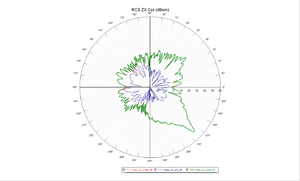 ZX Cut of RCS is dBsm
 -
 YZ Cut of RCS is dBsm


